
DIGITAL TECHNOLOGIES PAPER 3 (PRACTICAL) ANSWERS
QUESTION 1
(1a) EARTH PROCESSES AND CHANGES
Some Earth processes and changes in the Earth system can be studied on a global scale. Other interesting research questions may concern processes that take place on a scale of a meter or less. The properties of our environment vary over different spatial scales, so it is essential that we collect data that can be examined as local, regional and global datasets. Changes can take place slowly or very quickly, so it's important to take measurements around the world on a continuous basis.
(1c)
Some Earth processes and changes in the Earth system can be studied on a global scale. Other interesting research questions may concern processes that take place on a scale of a meter or less.
The properties of our environment vary over different spatial scales, so it is essential that we collect data that can be examined as local, regional and global datasets. Changes can take place slowly or very quickly, so it's important to take measurements around the world on a continuous basis.
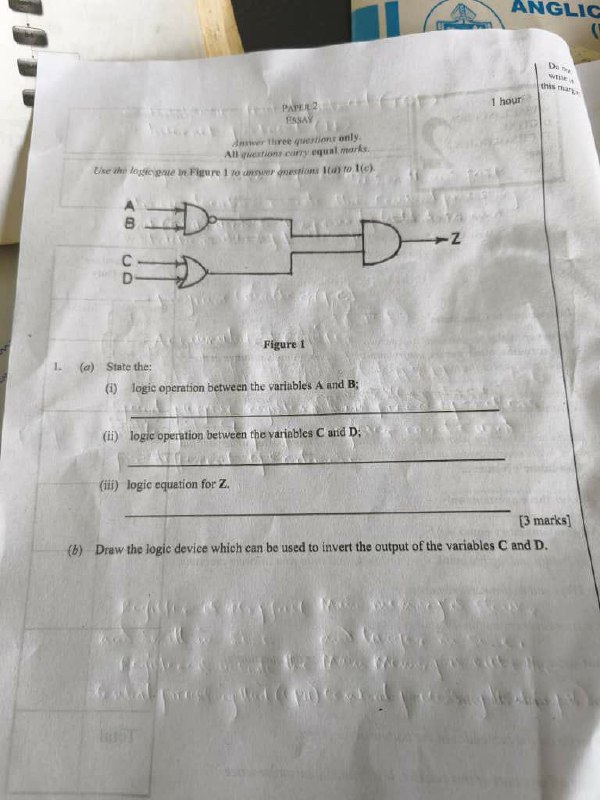
QUESTION 1
(a)
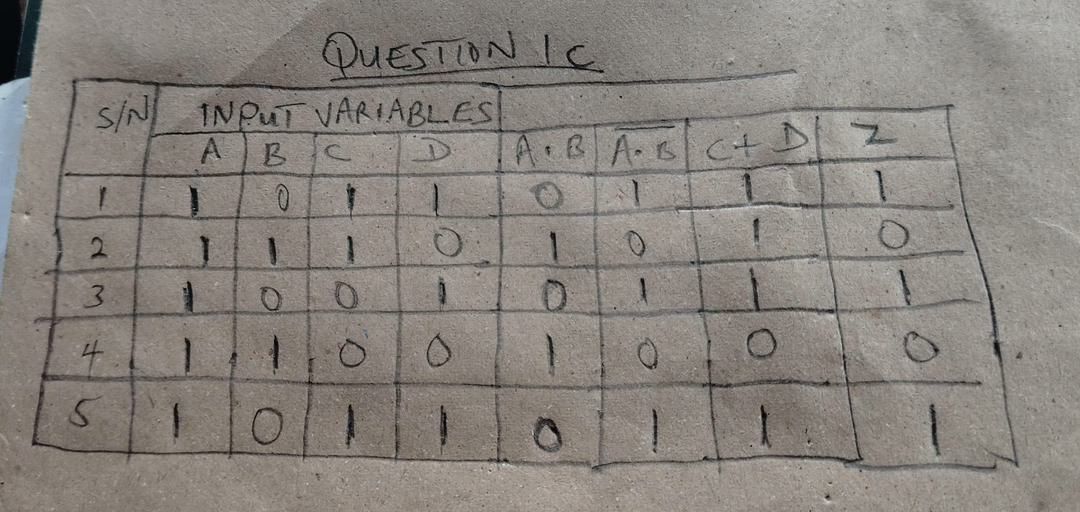
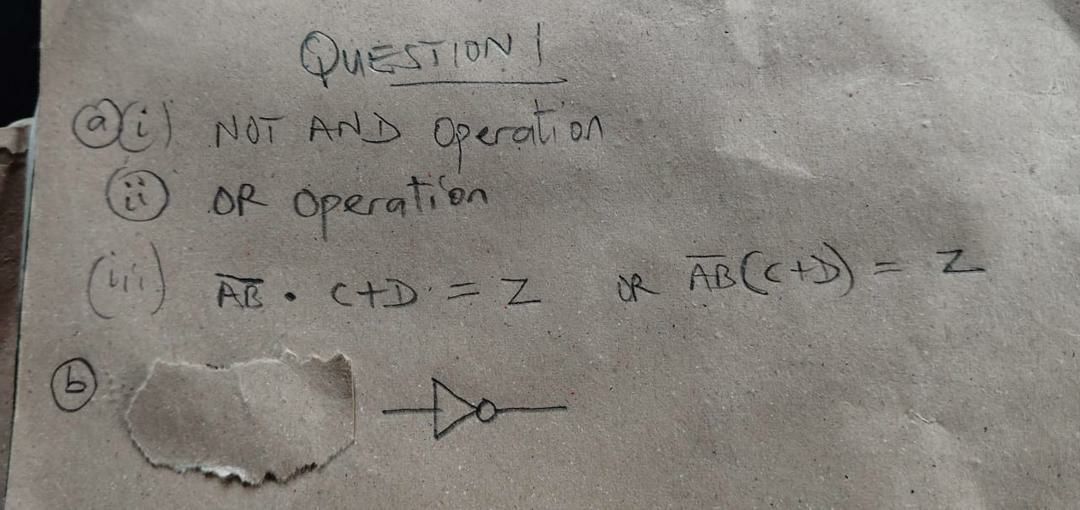
- (i) Logic operation between A and B: This is a NAND operation.
- (ii) Logic operation between C and D: This is an OR operation.
- (iii) Logic equation for Z: The outputs of the two gates are connected to an AND gate: Z = (A·B)̄ · (C + D)
(b)
The logic device used to invert the output is a NOT gate (Inverter).
QUESTION 3
(a)
A register is a small high-speed storage location inside the CPU used for holding data, instructions, or addresses temporarily during processing.
(b)
- (i) Program Counter (PC)
- (ii) Accumulator
(c)
A special purpose register performs a specific dedicated function, WHILE a general purpose register is used for general data processing and temporary storage.
QUESTION 4
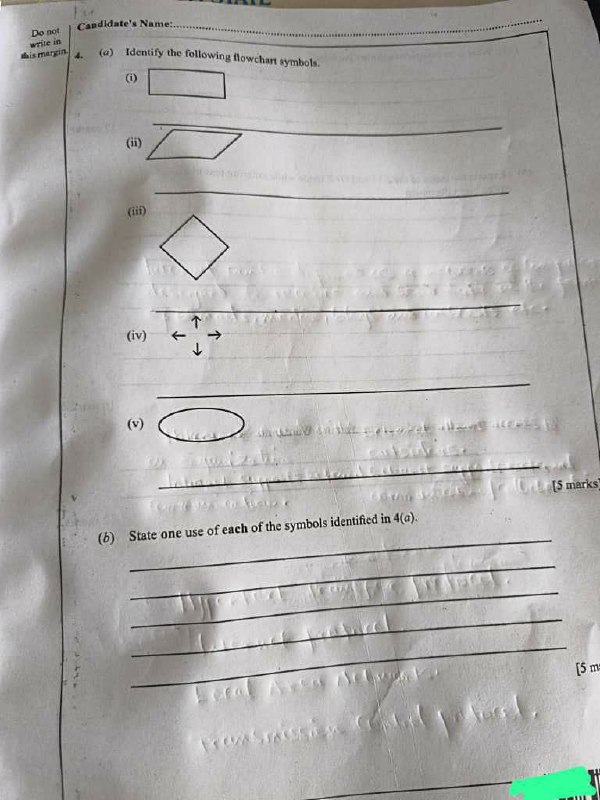
(a) Flowchart Symbols
- (i) Process symbol / Rectangle
- (ii) Input and Output symbol / Parallelogram
- (iii) Decision symbol / Diamond
- (iv) Flow line / Arrow
- (v) Terminal symbol / Start–Stop symbol / Oval
(b) Uses of the Symbols
- (i) It is used for processing data or carrying out an operation.
- (ii) It is used for entering input or displaying output.
- (iii) It is used for making decisions or testing conditions.
- (iv) It is used for showing the direction of flow of a program.
- (v) It is used for indicating the start or end of a program/process.
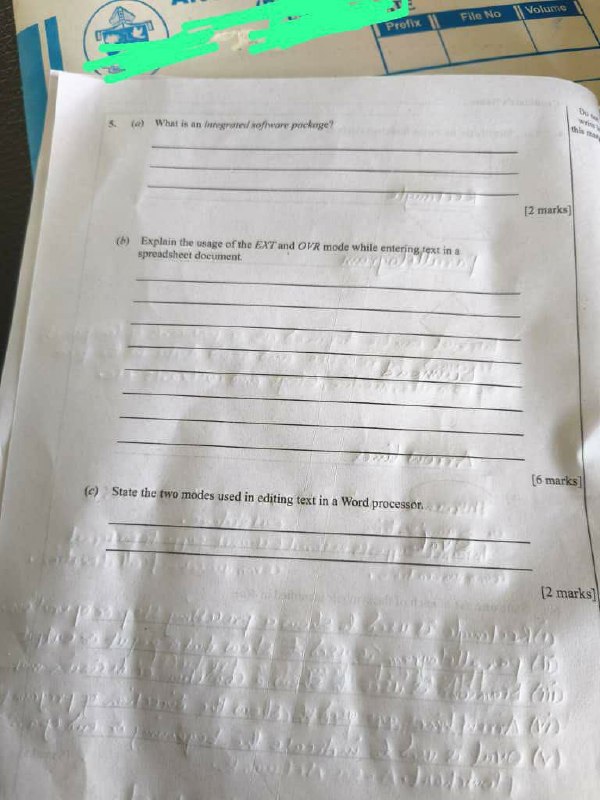
QUESTION 5
(a)
An integrated software package is a collection of related application programs combined into one package that can work together and share data easily.
(b)
- (i) EXT mode (Extend mode): This mode is used to extend or enlarge the selection of cells or text in a spreadsheet using the keyboard directions.
- (ii) OVR mode (Overwrite mode): This mode is used to replace existing characters with new ones as typing continues instead of inserting new characters between them.
(c)
- (i) Insert mode
- (ii) Overtype (Overwrite) mode
OBJECTIVE ANSWERS (Paper 1)
| 01 – C | 02 – B | 03 – A | 04 – B | 05 – A |
| 06 – D | 07 – C | 08 – D | 09 – A | 10 – A |
| 11 – C | 12 – D | 13 – D | 14 – B | 15 – D |
| 16 – A | 17 – B | 18 – C | 19 – D | 20 – C |
| 21 – A | 22 – D | 23 – D | 24 – B | 25 – A |
| 26 – D | 27 – A | 28 – B | 29 – A | 30 – A |
| 31 – C | 32 – B | 33 – B | 34 – B | 35 – D |
| 36 – C | 37 – D | 38 – D | 39 – B | 40 – A |
| 41 – C | 42 – C | 43 – D | 44 – B | 45 – A |
| 46 – A | 47 – C | 48 – B | 49 – D | 50 – A |

 Examsmooth
Leave a comment